Invoices, quotes and stock in one place — and your real profit on every sale
Simple business software for shops and service companies. Works on your phone or computer, in your language.
No credit card · Ready in 2 minutes
An invoice in 30 seconds
Pick the customer and items, send a PDF or a WhatsApp link, and record the payment.
Real profit on every item
Each sale keeps its cost, so you see true profit by product, service, branch and campaign.
Stock and money under control
Stock per branch, supplier bills, what customers owe you and VAT due — on one screen.
Start in three steps
Add what you sell
Products or services with their cost — you do it once.
Send quotes and invoices
From your phone or computer, in the language you work in.
See your real profit
Hamesh turns every sale into profit by item, branch and month.
Everything a small business needs to sell and know its profit
Quotes that turn into sales
Multi-line quotes, follow-up reminders and one click to turn a quote into an invoice.
Invoices and payments
Partial payments, overdue tracking, PDF and WhatsApp sharing, and tax per line.
Stock per branch
Each branch or warehouse keeps its own stock; sales and purchases update it.
Purchases and suppliers
Supplier bills, what you owe and when, and the VAT you paid.
A team with the right access
Employees create invoices without seeing your costs or profit.
Profit reports
Profit by item, campaign and period, plus a VAT summary.
See Hamesh on your phone
Real screens from the app, not mock-ups.
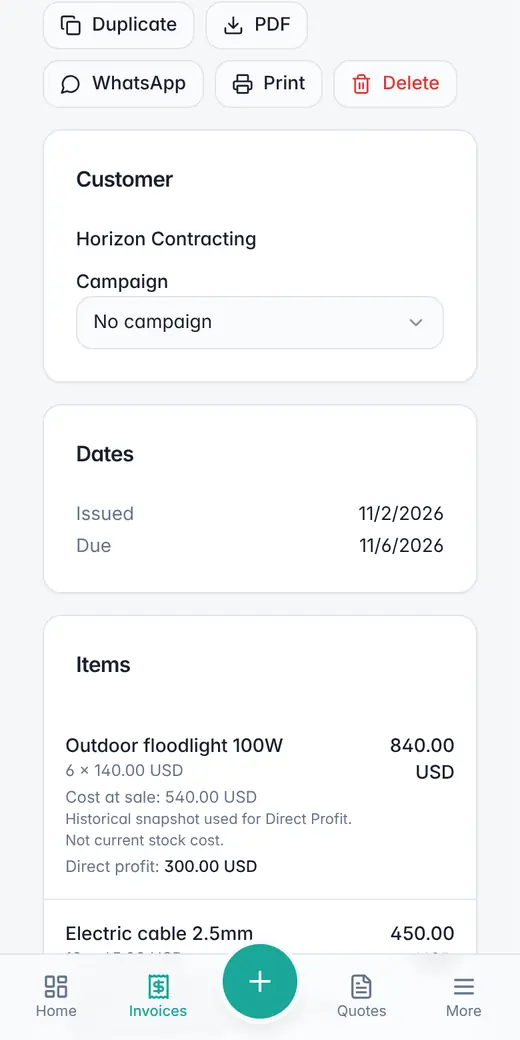
Lines, payment and balance on one screen. Send it as a PDF or on WhatsApp.
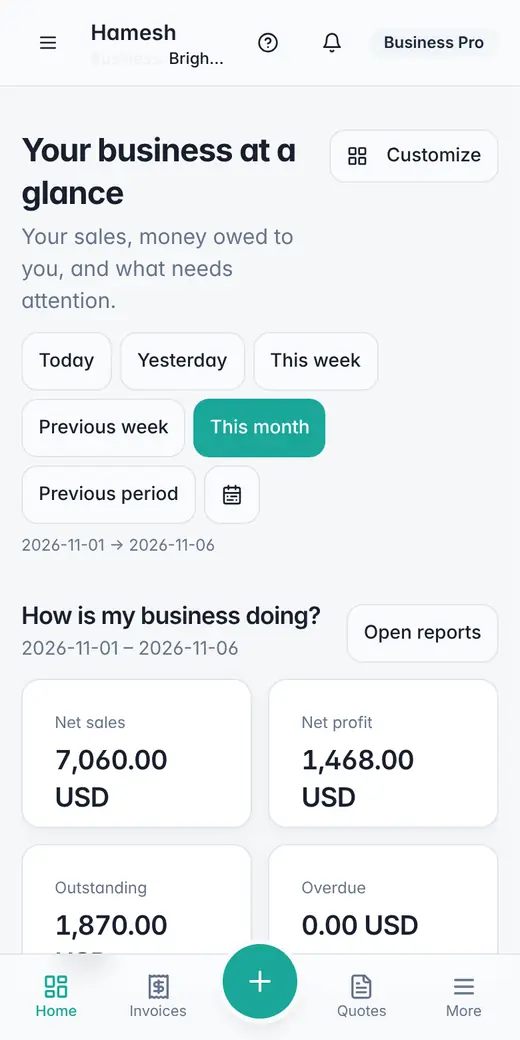
Sales, net profit, what customers owe you and what is overdue.
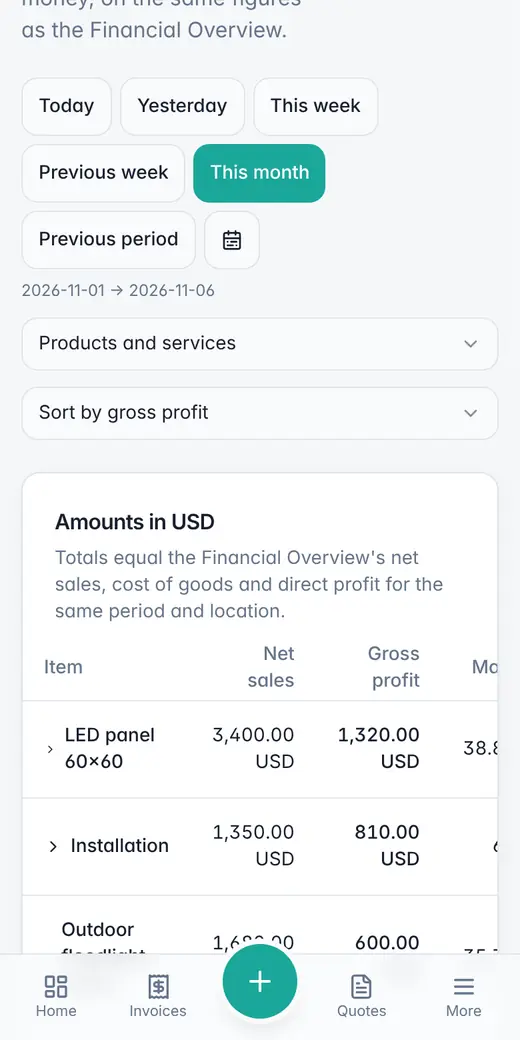
See which products and services really make you money.
Still on paper or Excel?
Hamesh for your kind of business
Retail shops
Stock, invoices and profit per product for shops.
Service businesses
Quotes, invoices and profit per service for service firms.
Multi-branch businesses
Stock per location, transfers and profit per branch.
Wholesale & trading
Sales orders that reserve stock, supplier bills and payables.
Online sellers
Prices with marketplace and payment fees, stock and real profit.
Quotes, stock & profit
How quotes, invoices, stock and profit connect in Hamesh.
Built with you
Hamesh is new. Tell us what your business needs — we answer every message ourselves.
Frequently asked questions
What is Hamesh?
Hamesh is business software for shops, trading companies and service firms. It covers quotes, invoices, purchases, stock per branch or warehouse, expenses, and profit by product, service and branch. It runs in the browser in Arabic, English, Spanish, Portuguese, Hindi and Malay.
Can I issue invoices in Arabic?
Yes. Invoices and quotes are produced in the language you are working in, and in Arabic they are laid out right to left. Switch to English when you need an English document. You can download the PDF or share it on WhatsApp.
How does Hamesh handle tax on invoices?
You set your own tax rate, or none, for your business. Hamesh does not fix rates for you, because tax rules differ by country and change over time. You can enter prices with or without tax, and change the tax on any document or line.
Is Hamesh a certified government e-invoicing solution?
No. Hamesh does not issue government e-invoices and is not certified by any tax authority. If your business must e-invoice through an official system, use an approved solution for those invoices. Hamesh is for quotes, everyday invoicing, stock and profit.
Can I track stock in more than one branch or warehouse?
Yes. Add each branch or warehouse as a location with its own stock. Purchases add stock where they arrive, invoices deduct it from the location that sold, and you can transfer stock between locations with the history kept.
How does Hamesh show my real profit?
Hamesh records the cost of each item at the moment you sell it, so its reports show net sales, cost of goods and gross profit per product, service, branch and campaign. Expenses such as rent and salaries are tracked as well.
Can I bring in my existing data?
Yes. Import products, services, customers, suppliers and past sales from an Excel or CSV file, or paste a table. You match the columns and review everything before it is saved.